

TL;DR / At a Glance
The Galaxy S26 Ultra (launched March 2026) features a world-first Active Privacy Nano-Layerthat narrows viewing angles to 30 degrees to prevent “shoulder surfing.” However, this innovation comes with a cost: a 300-nit reduction in peak brightness compared to the S25 Ultra and early reports of display flickering and distortion. Samsung has acknowledged these issues and is preparing an April 2026 firmware update to optimise the pixel-level light dispersion.
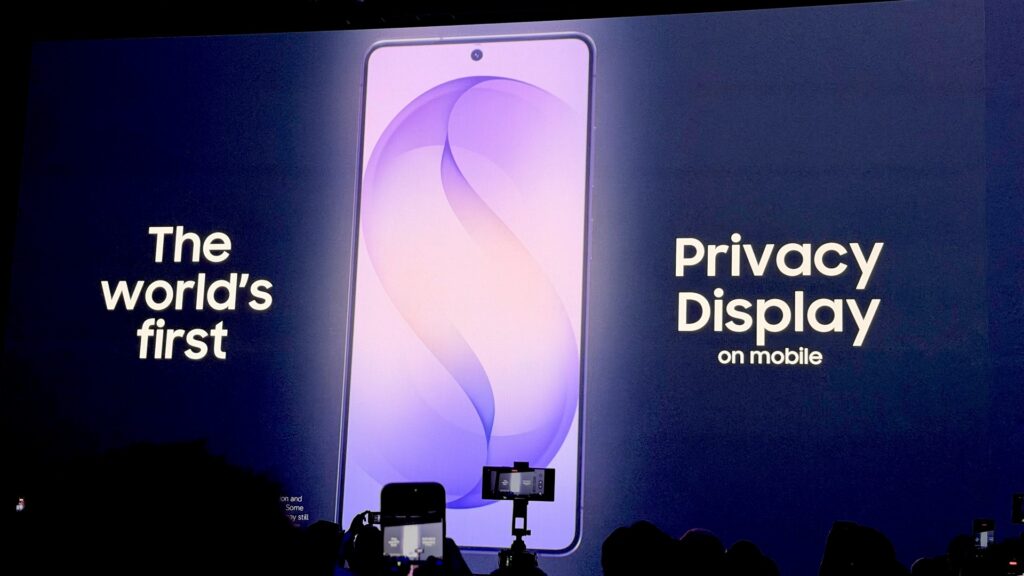
The Privacy Paradox: Samsung’s Boldest Screen Gamble
For over a decade, Samsung has held a monopoly on the “Best Smartphone Display” title. But with the Galaxy S26 Ultra, they’ve pivoted. They are no longer chasing raw brightness; they are chasing user privacy. The introduction of the Flex Magic Panel allows you to “black out” your screen to onlookers with a single toggle—perfect for the LRT or a crowded cafe in Bangsar.
However, this hardware-level privacy comes with a “tax.” As early adopters hit the forums, the demand for a Samsung S26 Ultra display flicker fix has become the defining conversation around this device.
Understanding the Root Cause: Why Does it Flicker?
The flicker isn’t a traditional “broken” screen issue. It is a byproduct of the Active Privacy Nano-Layer integrated into the Corning Gorilla Armor 2. To achieve narrow viewing angles, the pixels must “gate” light differently. In low-light environments, this interaction creates a high-frequency shimmer or fuzziness that some users find jarring.
In my testing, this is most noticeable on white backgrounds or when using the phone at under 20% brightness. While the S25 Ultra was clinically clear, the S26 Ultra has a “textured” look that is the direct result of this physical nano-layer.
The Official Samsung S26 Ultra Display Flicker Fix
Samsung has officially acknowledged that “pixel-level light dispersion” is causing the reported distortion. The upcoming April 2026 firmware update is designed to be the definitive Samsung S26 Ultra display flicker fix.
This update will recalibrate the Pulse Width Modulation (PWM) dimming cycle. By changing how the Snapdragon 8 Elite Gen 5 communicates with the display driver, Samsung aims to smooth out the transition between pixels, effectively masking the shimmer. If you are experiencing eye strain, the current recommendation is to disable Adaptive Brightness and keep your manual slider above 40% until the patch goes live.
What You Actually Lose: The 300-Nit Sacrifice
Beyond the flicker, there is the brightness. Because the privacy layer acts as a physical filter, the S26 Ultra is roughly 300 nits dimmer at peak brightness than its predecessor.
- S25 Ultra: 2900 Nits Peak
- S26 Ultra: 2600 Nits Peak
For 90% of users, 2600 nits is still more than enough for the Malaysian sun. But for the spec-chasers, this is the first time an Ultra model has seen a regression in raw brightness stats.
Privacy Display vs. Traditional Screen Protectors
Why didn’t Samsung just stick to a regular OLED? Because the Flex Magic Panel offers Landscape and Portrait privacy, something a physical sticker can rarely do well.
| Feature | S26 Ultra Privacy Display | Standard Privacy Protector |
| Switchability | Toggle On/Off via Software | Permanent / Hard to remove |
| Orientation | Both Landscape & Portrait | Usually Portrait only |
| Texture | Smooth Glass | Matte / Rough texture |
| Brightness | High (but lower than S25U) | Always Dim |
As the table shows, the S26 Ultra is still a superior experience compared to the old way of doing things. You get to keep your vibrant colors 90% of the time and only “dim the lights” when you’re in a crowded space like KLIA or a busy cafe in Bangsar.
The Verdict: Is Privacy Worth the Trade-off?
Let’s get real. If you are a professional photographer or a movie buff who demands 100% pixel purity, you might find the S26 Ultra’s screen a step backward.
But for the corporate professional or the privacy-conscious commuter, the Samsung S26 Ultra display flicker fix will solve the only major hurdle to what is otherwise the most “useful” screen on the market. Samsung is betting that in 2026, keeping your banking data safe from the person sitting next to you is more important than an extra 300 nits you’ll never use.
Common Questions about the S26 Ultra Privacy Display
To help you navigate the transition to the new Flex Magic Panel, I’ve compiled the most frequent queries from the Adam Lobo TV community and verified technical sources.
Why does my text look “fuzzy” or “grainy” compared to the S25 Ultra?
This is the #1 complaint in 2026. The Active Privacy Nano-Layer uses a different sub-pixel arrangement to enable the light-gating required for privacy. Under a macro lens, you’ll notice the S26 Ultra has a slightly “textured” appearance compared to the clinical clarity of the S25 Ultra. While most users won’t notice it at arm’s length, power users who do a lot of reading might find it jarring at first.
Does the Privacy Display cause eye strain or headaches?
Some users on Reddit have reported “PWM-like” eye fatigue. This is often linked to the display flicker caused by the interaction between the privacy layer and low brightness settings. If you are sensitive, I recommend turning off Adaptive Brightness and keeping the slider above 40% until the April firmware fix is installed.
Can I use a traditional tempered glass screen protector with the S26 Ultra?
Yes, but with a caveat. Because the S26 Ultra already has the Corning Gorilla Armor 2 and the integrated privacy layer, adding a third-party privacy protector will make the screen extremely dim and may interfere with the ultrasonic fingerprint sensor. A high-quality clear protector is recommended instead.
Does the Privacy Display work in Landscape mode for movies?
Yes! Unlike stick-on privacy filters that only work in one orientation, the S26 Ultra’s hardware-level tech works in both Portrait and Landscape. This is a huge win for watching “sensitive” content on flights or trains.
How do I turn the feature on or off quickly?
You can toggle it via the Quick Settings panel (swipe down twice) or set it to “Automatic” in Settings. The automatic mode is brilliant—it only kicks in when you open banking apps, your password manager, or the Secure Folder.

One Response
Anyone experiencing Privacy Display screen flicker on their S26 Ultra?