TL;DR / At a Glance: Unveiled at WWDC26, the latest generation of Apple Intelligence shifts the digital layout away from standard conversational chatbots to embrace agentic computing—running specialised background processes natively across your software. Instead of requiring constant user inputs, this background architecture introduces autonomous tools like Safari’s Notify Me layout monitor, a single-tap automated security patching macro inside the new Passwords app, on-device Call Context processing within the Phone app, and plain-text Shortcuts generation.

Let’s be honest about the current state of consumer artificial intelligence: the industry has become completely obsessed with conversational chatbot windows. Every tech titan expects you to open a separate application interface, type out an incredibly detailed multi-sentence prompt, and sit there staring at a progress bar just to handle basic, everyday computing tasks. It is uninspired, it interrupts your actual workflow, and it essentially treats the user as an unpaid prompt engineer.
But at WWDC26, Apple quietly launched a massive structural counter-attack (without flooding its keynote with the mention of “agentic AI”). Tucked underneath the high-profile marketing splash of their headline platform updates, they unmasked the true strength of Apple Intelligence: a silent, underground army of background agentic computing tools built right into the system architecture.
Operational Intelligence Architecture
| Paradigm Era | Primary User Interface | System Integration Depth |
| Legacy Chatbot Model | Gated standalone text prompt fields | High friction; requires manual user inputs and disrupts active workflows. |
| Agentic Computing Framework | Omnipresent system background layer | Zero friction; executes cross-app macro behaviors natively in the system kernel. |
Instead of screaming for your attention, these invisible processes run completely in the background of your daily carry. They listen to data streams, analyse webpage states, and rewrite cross-app macro behaviors natively while you aren’t even looking. Let’s deconstruct how this hidden architectural shift completely redefines three massive apps on your device.
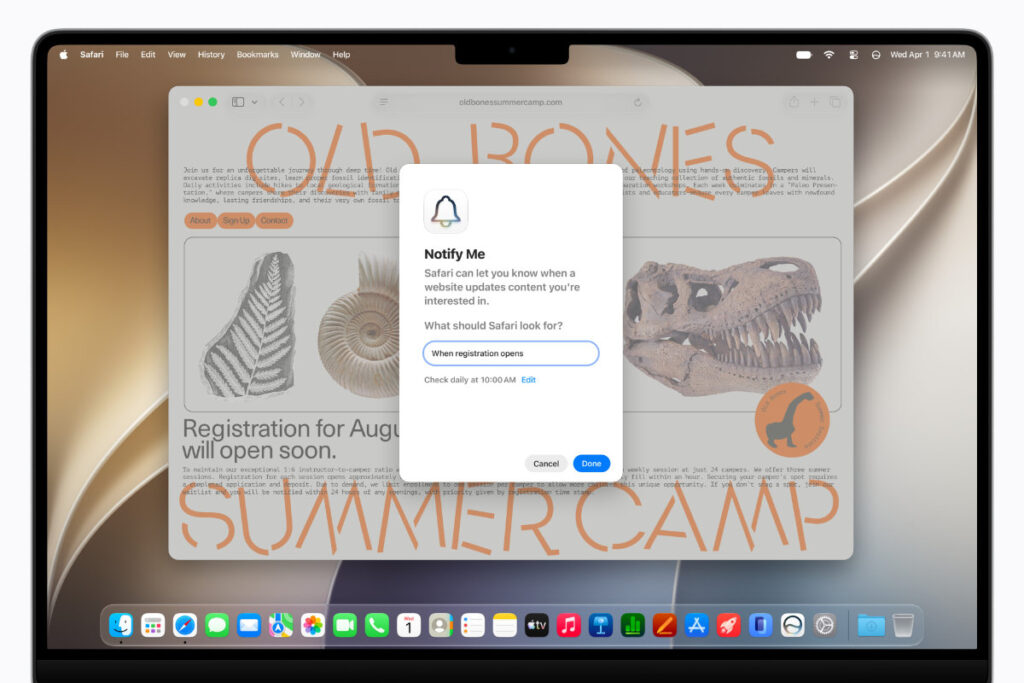
1. Safari “Notify Me” & Taming the Tab Chaos
We all know the sheer mental fatigue of keeping fifty different open browser windows alive because you are waiting for a critical, time-sensitive layout update—like checking if a product has come back in stock or waiting for camp registrations to open.
With the new Apple Intelligence layer, Safari introduces automated background page monitoring via Notify Me.
| Active Browser Action | Traditional Web Inspection Loop | Safari Agentic System Standard |
| Page-State Verification | Requires manual, continuous tab refreshing or clunky third-party scripts. | Autonomous Layout Telemetry Tracking: Monitors underlying webpage code state changes silently in the background. |
| Tab Architecture Control | Manual categorization, dragging, dropping, and tab grouping workflows. | Automated Topic Clustering: Machine models analyze similarities across pages, automatically organising related tabs into topics. |
Instead of leaving tabs permanently open to siphon system resources, you can now simply use plain natural language to tell Safari what criteria you are tracking, drop the window out of view with total peace of mind, and let the browser monitor the page on your behalf.
The Safari “Notify Me” Execution Flow
| Step | System Phase | Core Technical Operation |
| 1 | Natural Language Target Input | User inputs plain-text criteria (e.g., describing what change they are waiting for) and closes the browser tab. |
| 2 | Background Telemetry Tracking | Safari runs persistent background checks, tracking layout variables without requiring active manual refreshes. |
| 3 | Live Event Trigger | The exact microsecond Safari detects the change, a native system notification is fired to your device so you can take immediate action. |
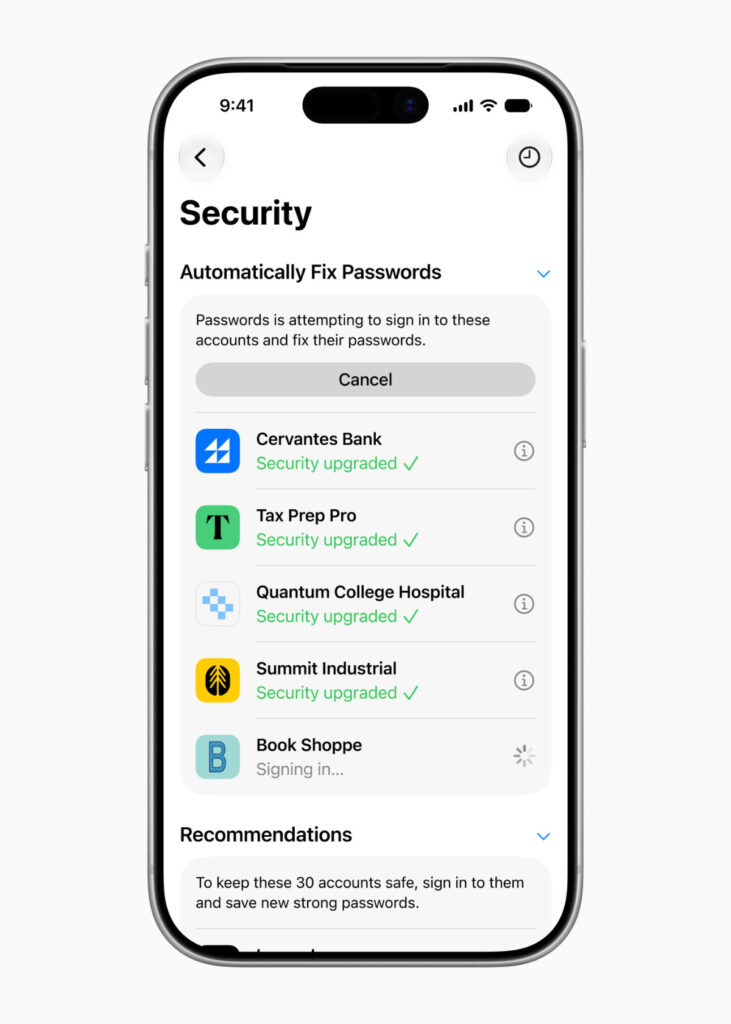
2. Passwords App: Auto-Patching Your Account Weaknesses
The addition of the dedicated Passwords app in iOS 27 and macOS Golden Gate goes way beyond acting as a secure repository for your digital credentials. While older credential tools simply alert you to weak or compromised passwords and expect you to manually log into that site to fix it, Apple’s agentic security framework handles the friction for you.
The Security Execution Matrix
| Security Phase | Manual Security Frameworks | Passwords App Agentic Automation |
| Breach Diagnostics | Displays a generic passive warning flag inside a settings menu panel. | Constantly alerts users regarding weak, re-used, or verified compromised credentials. |
| Credential Correction | Forces the user to click out to a browser, find a sub-menu, and create a text string. | Single-Tap Accounts Patching: Automatically updates eligible accounts to strong passwords with a single tap. |
The second an eligible account is identified as vulnerable, the platform presents a streamlined correction path. Behind the scenes, the Passwords app leverages Apple Intelligence and Safari to securely navigate through the target website on your behalf, log in, update your old credentials to a strong password string, and lock down the account—all resolving with just a single tap and zero manual layout digging.
3. Shortcuts AI and Context-Aware Inbound Calling
The final frontier of this silent automation rollout lives inside Shortcuts and the primary Phone application. For years, creating complex, multi-layered system scripts required dragging and dropping dozens of fragile conditional logic blocks or writing complex layout strings.
Now, creating automations is completely democratised by letting you simply describe what you need in natural language. You can type or describe an intricate system macro in plain natural text: “When I’m leaving work, message Adam I’m on my way with my ETA”. I’m so excited for Shortcuts 2.0. This is something genuinely useful and Shortcuts is something I use on both my Mac and iPhone.
Apple Intelligence reasons over the plain-text description, pulls together the exact system parameters and third-party app actions required, and automatically assembles all the required execution steps for you. If you want to tweak or add a logic block later—such as automatically launching your favorite podcast at the same time—you simply describe the change, and Shortcuts makes the adjustment instantly.
Plain-Text Intent to Device Automation
| Stage | Process Layer | Underlying Core Execution |
| 1 | Natural Language Prompt | User enters plain text or speaks a custom requirement describing an automation goal. |
| 2 | Intent Parsing Engine | Apple Intelligence reasons over the natural language input to map out required application tools. |
| 3 | Device Script Compilation | The engine automatically pulls together the system and app action blocks to assemble the shortcut. |
This depth of contextual awareness extends directly to active cell communications via Call Context inside the Phone app. When you place an inbound call to a business, the Phone app proactively surfaces relevant information extracted directly from your other applications.
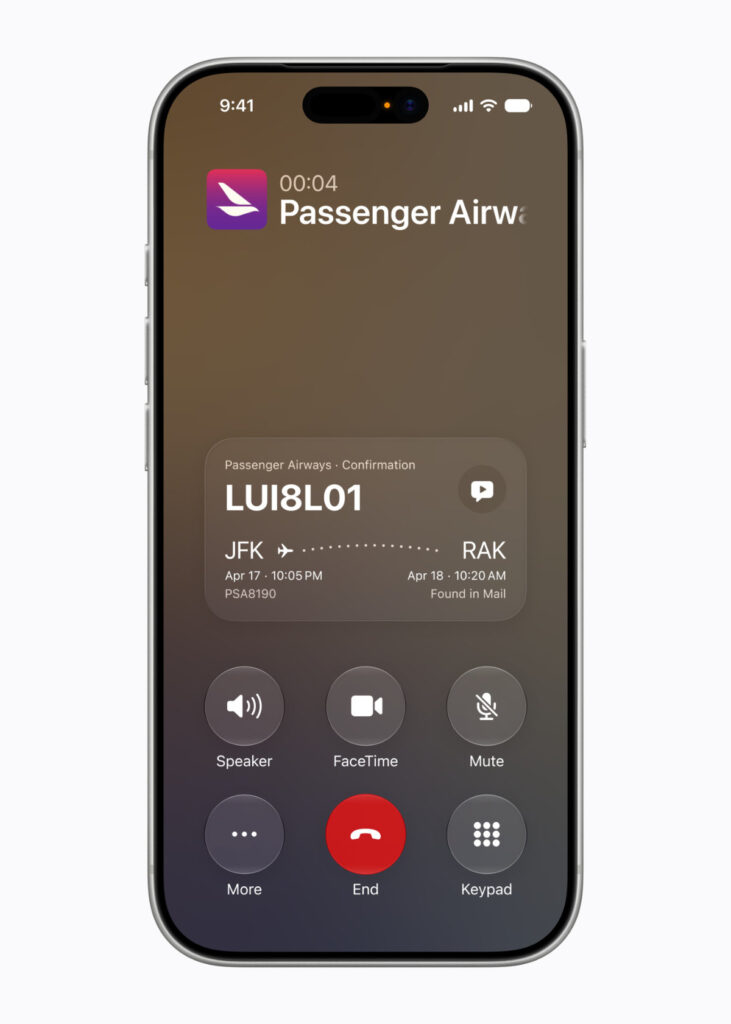
If you call an airline to change your flight details, the Phone app automatically identifies the merchant type, crawls your local Mail or app index, extracts your confirmation code, and surfaces it cleanly right on your display the moment the call starts. It is an exceptionally smart feature that runs entirely on-device, processing your words securely without sharing data or call content with Apple or anyone else.
Other Little Things
- Smart Reply Splicing: Moving past generic, robotic text generators, the writing tools inside Mail offer more capable, context-aware suggestions, letting you quickly take action with your favourite native and third-party applications.
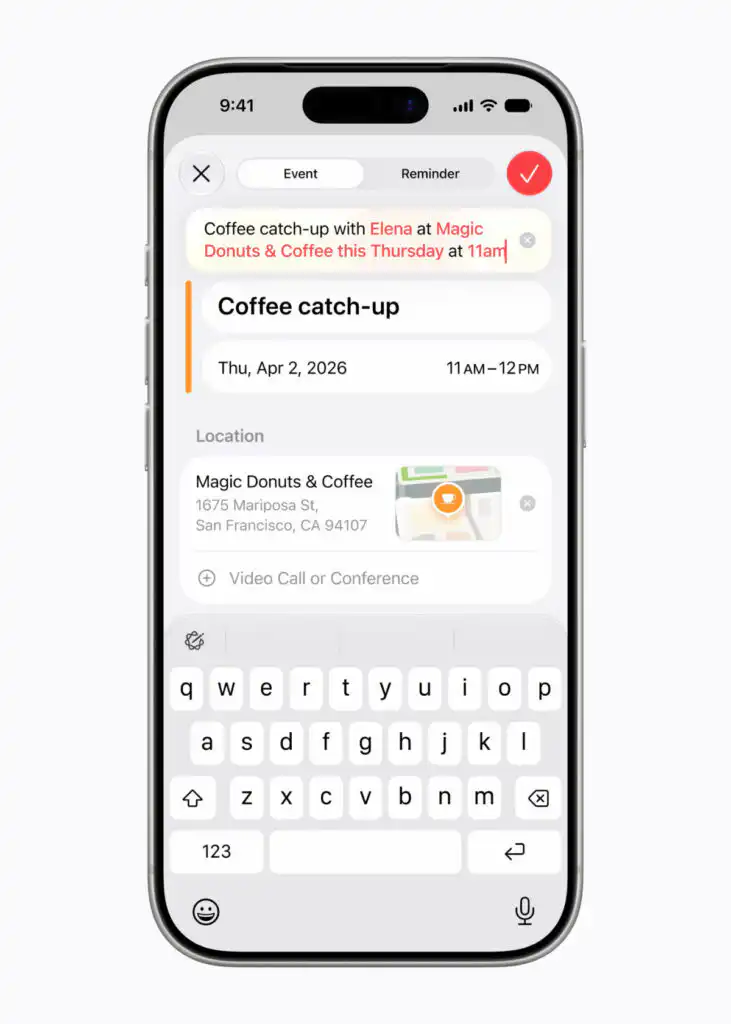
- Dynamic Calendar Descriptive Splicing: You can add or modify system events by casually describing them in natural language. Typing a description automatically parses contacts, maps location titles, and adjusts event frequencies for you on the fly.
- The Master Directory Hub: This invisible background orchestration logic operates across the entire platform matrix. To see how these background agentic layers sync up with your wider screen layouts, read our live WWDC26 Master Wrap-Up Hub Page.
Adam Lobo’s Take
Apple has executed a brilliant strategic pivot with Apple Intelligence. While the rest of the technology landscape is wasting massive computational resources building standalone AI chat rooms, Cupertino realised that the ultimate goal of software intelligence is to act as an un-obtrusive digital butler that executes system tasks behind the scenes.
Having an operating system that can automatically monitor product updates or camp signups in Safari while your phone is sitting in your pocket, fix your weak account credentials with a single tap, or surface an airline confirmation code right when you dial a support desk completely on-device, is how mobile software should actually function. It is practical, it respects your time, and it links directly back to the multi-modal workflows we analysed in our Siri AI Revolution deep dive.
The hidden automation upgrades inside iOS 27 and macOS Golden Gate show that the true value of modern intelligence isn’t about generating essays or cute caricatures, it’s about eliminating daily friction.
Are you guys excited to hand your background browser and system macro tasks over to Apple Intelligence’s invisible agents, or do you prefer controlling every single menu tap manually? Let me know your thoughts in the comment section below!