iPadOS 26.1 Update Reinstates Slide Over, Adds New Local Capture Controls
Apple have released iPadOS 26.1, an update that reintroduces the Slide Over multitasking feature and adds new controls for the system’s Local Capture recording function.
The update is now available for download on all compatible iPad models through the Software Update section in the Settings app.
Slide Over Reintegrated with New Windowing

The Slide Over feature, which was absent from the initial iPadOS 26 release, has returned. It is now integrated into the new windowing system, allowing a single app window to float above other applications or full-screen apps.
According to the update notes, this redesigned Slide Over window can be temporarily hidden by “stashing” it off the left or right edge of the screen and recalled with a swipe.
Unlike previous versions, the new Slide Over window is resizable, supporting various sizes and aspect ratios. The function is intended for quick tasks like message replies or checking feeds while another primary application is active.
Local Capture Gains Audio and File Controls
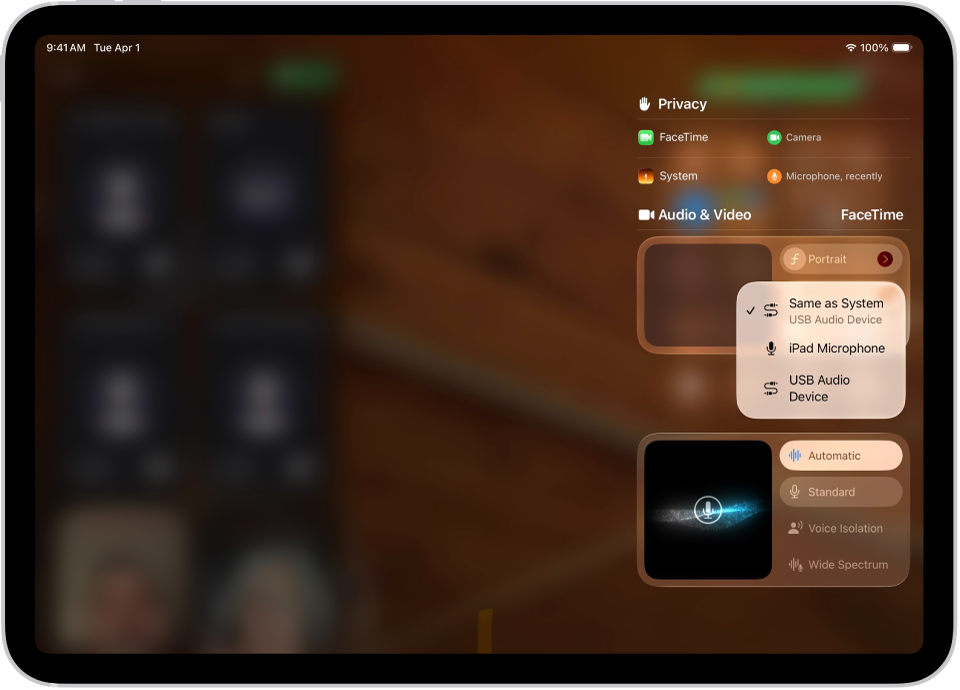
The Local Capture feature, which allows a user to record their own high-quality audio and video feed during a video call, has also been updated. This feature enables participants to capture clean recordings locally, independent of internet call quality, for later use in production.
The iPadOS 26.1 update introduces two key controls for this feature. First, users can now specify a save location for their recordings.
Second, the update adds gain control for external USB microphones. This allows users to adjust recording levels directly, providing more technical control over audio input and helping to prevent distorted or quiet recordings.