TL;DR / At a Glance
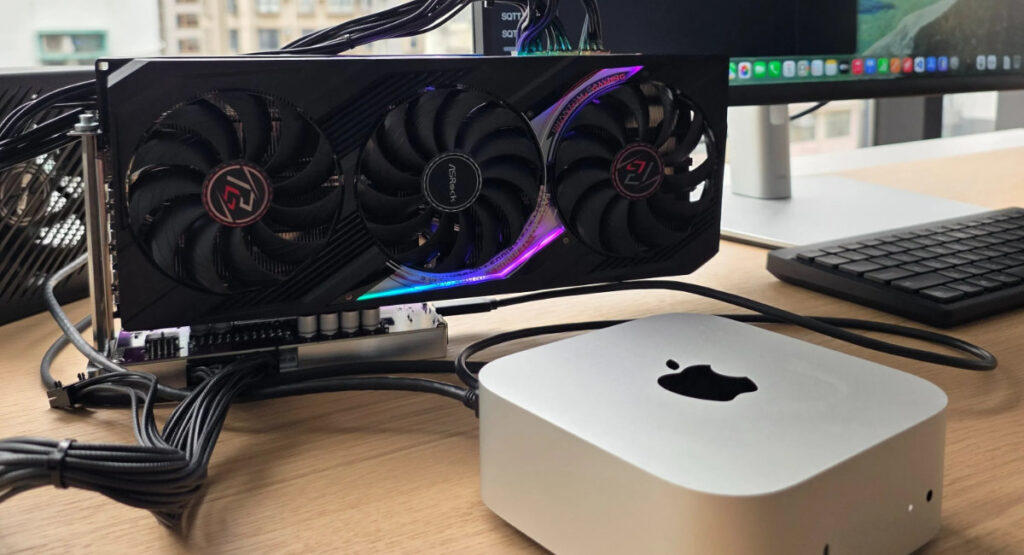
Apple has officially approved the TinyGPU driver, allowing Mac Mini eGPU configurations to act as local AI servers. Using Thunderbolt 4 or USB4, users can now connect Nvidia (Ampere+) and AMD (RDNA3+) cards to accelerate LLMs like Llama 4, bypassing internal memory limits for the first time on Apple Silicon.
The Death of the “Walled Garden” Ceiling
For five years, the Apple Silicon narrative was built on Unified Memory Architecture (UMA). It was fast, efficient, and great for video—but it had a hard ceiling. If you bought a 16GB Mac Mini, you were stuck with 16GB for life. In the AI era, where LLMs (Large Language Models) “live” in the GPU’s memory, this made the Mac Mini a toy for researchers.
The TinyGPU driver changes the math. By allowing the Mac to hand off “compute kernels” to an external Nvidia RTX 4090 or AMD RX 9000-series, Apple is finally letting the Mac Mini wear an “Exosuit.” You keep the efficiency of macOS for your daily tasks, but you “bolt on” 24GB or 48GB of dedicated VRAM for the heavy lifting.
Use Cases: The Local AI Server Explained
A “Dedicated AI Server” is a machine designed to do one thing: high-speed parallel math. By connecting an eGPU, your Mac Mini becomes exactly that. Here is what that enables:
- Running 70B+ Parameter Models: Most pro-grade AI models (like Qwen 2.5 72B) require roughly 40GB+ of VRAM to run smoothly. Previously, you needed an M2/M4 Ultra chip to even open these files. Now, an external GPU handles the model while your Mac’s internal chip stays cool.
- Privacy-First Development: In 2026, data privacy is the new gold. Corporations are terrified of their code leaking into OpenAI’s training sets. With this eGPU setup, a developer can run a “Coding Copilot” entirely offline. No data leaves the Thunderbolt cable.
- High-Speed Diffusion: Generating 4K AI video or high-res art via Stable Diffusion or Flux.1 is a VRAM hog. An eGPU cuts “Time to First Token” and generation speeds by up to 400% compared to base M-series NPUs.
Technical Implications: The 100 TOPS Threshold
Apple’s internal Neural Engine (NPU) in the M4/M5 series is impressive, hitting around 38–50 TOPS. However, a dedicated Nvidia Blackwell or Ampere card can push well over 200–500 TOPS for specific AI tasks. By approving this driver, Apple is admitting that for the “Pro” AI market, their internal silicon cannot—and shouldn’t have to—do it all alone.
Key Specs: Mac AI Compute Comparison (2026)
| Feature | Mac Mini (M4 Internal) | Mac Mini + RTX 5090 eGPU | Mac Studio (M4 Ultra) |
| Max VRAM | 32GB (Unified) | 32GB (Dedicated) + 32GB (UMA) | 192GB (Unified) |
| AI Performance | ~38 TOPS | ~500+ TOPS | ~76 TOPS |
| Model Support | 8B – 14B Models | 70B – 100B Models (INT4) | 70B – 400B Models |
| Primary Use | Daily Productivity | Local AI Research / Dev | Pro Video / Max LLM |
The Future: Is Gaming Next?
Currently, the TinyGPU driver is a “Compute-Only” play. It talks to the GPU cores but doesn’t “draw” to the screen. To see Final Cut Pro or Resident Evil rendered by an eGPU, Apple must update the Metal API to recognize external PCIe lanes as display outputs. However, with the Mac Pro officially discontinued this month, the path is clear: Apple is moving toward a Modular Mac Ecosystem where the “Pro” features are sold as external, upgradable accessories.
Source: XDA-Developers, Reddit
Frequently Asked Questions
Which external GPUs are compatible with the Mac Mini eGPU update?
The TinyGPU driver officially supports Nvidia Ampere (RTX 30-series) and newer, as well as AMD RDNA3 (RX 7000-series) and newer. To connect these to your Mac, you will need a certified Thunderbolt 3, Thunderbolt 4, or USB4 enclosure.
Can a Mac Mini eGPU setup run local LLMs like Llama 4?
Yes. By utilising an external GPU, the Mac Mini can access 24GB or more of dedicated VRAM. This allows the system to run high-parameter models like Llama 4 and Qwen 2.5 72B locally—tasks that previously exceeded the internal memory limits of base M-series chips.
Does the official eGPU support work for gaming or video rendering?
Currently, the official approval is limited to AI and compute workloads through the tinygrad framework. Traditional graphics tasks, such as Metal-based gaming or Final Cut Pro video rendering, are not yet supported by this specific driver.
Do I need to disable System Integrity Protection (SIP) to use TinyGPU?
No. Because the TinyGPU driver has received official approval from Apple, it works natively within macOS. Users no longer need to bypass system security protections or disable SIP to utilize external GPU compute power.