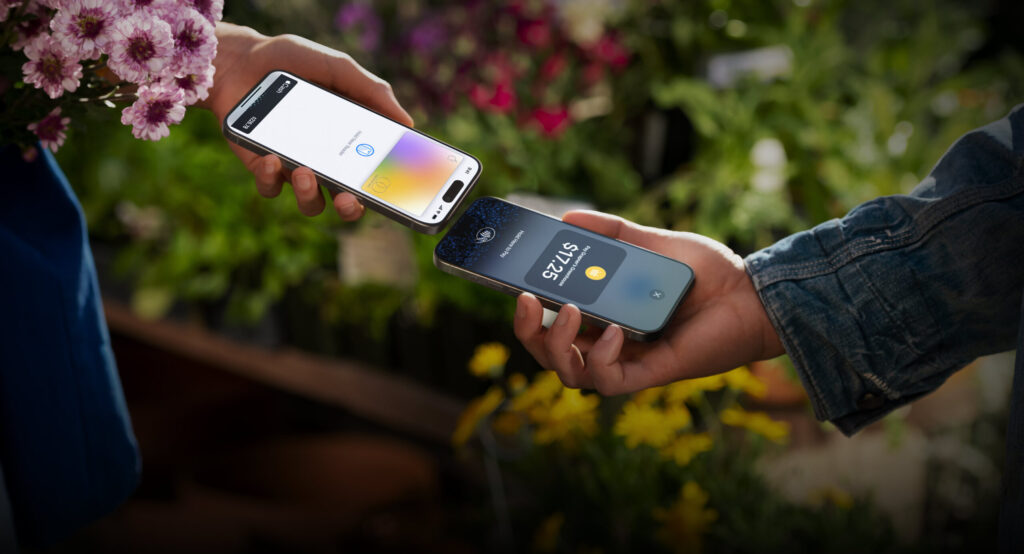
TL;DR / At a Glance: Apple Tap to Pay on iPhone Malaysia works by using the built-in NFC chip in an iPhone 11 or later to securely read contactless payment data. Merchants simply enter the amount into a supporting app (like Stripe or HitPay), and the customer taps their card or phone against the merchant’s iPhone. No additional hardware is required, and all data is encrypted via Apple’s Secure Element.
The “Death” of the Traditional Card Terminal
Apple has officially announced the launch of Tap to Pay on iPhone in Malaysia. Starting today, April 22, 2026, local merchants—from high-end retailers at The Exchange TRX to street food stalls in SS2—can accept contactless payments directly on their iPhones.
The game-changer? Zero additional hardware. Small business owners no longer need to rent or buy expensive, clunky EDC (Electronic Data Capture) card terminals. All you need is an iPhone 11 or later and a partner-enabled iOS app.
The Partners: Who is supporting it today?
Apple is launching with a robust ecosystem of payment platforms. If you are a business owner using any of the following, you can enable Tap to Pay starting today:
- ADAPTIS
- Fiuu (formerly Razer Fintech)
- HitPay
- Stripe
- Zoho
Apple also confirmed that Apple The Exchange TRX will be implementing this at their checkout soon, allowing staff to complete sales anywhere on the floor without sending you to a fixed counter.
Security & Privacy: The Secure Element
For the “Buy Smart” crowd concerned about security, Apple’s implementation is industry-leading.
- NFC Technology: The transaction happens via a secure handshake between the customer’s card/device and the merchant’s iPhone.
- Secure Element: All transactions are encrypted and processed using the Secure Element.
- Privacy: Apple does not know what is being purchased or who is buying it. Card numbers are never stored on the device or Apple’s servers.
Tech Breakdown: Tap to Pay vs. Apple Pay
One of the most common questions from our community is: “Isn’t this just Apple Pay?” The answer is no. Here is the distinction:
What is Apple Pay? (The Buyer’s Side)
Apple Pay is a digital wallet. It allows you, the consumer, to tokenise your physical credit or debit cards into your iPhone or Apple Watch so you can pay at shops. It replaces your physical wallet.
What is Tap to Pay on iPhone? (The Seller’s Side)
Tap to Pay is a payment terminal. It allows the merchant to use their iPhone’s NFC chip to receive money.
- Hardware: It turns the merchant’s iPhone into a “Point of Sale” (POS) system.
- Acceptance: It doesn’t just accept Apple Pay; it accepts physical contactless Visa, Mastercard, MyDebit, and American Express cards, as well as other digital wallets (like Google Pay or Samsung Pay).
| Feature | Apple Pay | Tap to Pay on iPhone |
| Who uses it? | Consumers (You) | Merchants (The Business) |
| Purpose | To make a payment | To accept a payment |
| Requirements | A card added to the Wallet app | An iPhone 11+ and a Merchant App (Stripe, HitPay, etc.) |
| Hardware | iPhone / Apple Watch | iPhone 11 or later only |
Tap to Pay on iPhone Frequently Asked Questions (FAQ)
Do I need a new iPhone to use Tap to Pay?
No, you do not need the latest iPhone. Tap to Pay works on any iPhone 11 or later, provided it is running the latest version of iOS.
Can I use Tap to Pay on an Android phone?
No. This is an Apple-exclusive feature. However, Android users can still pay a merchant using Tap to Pay via their contactless cards or Google Wallet.
Does Tap to Pay work with MyDebit cards?
Yes. In Malaysia, Tap to Pay on iPhone officially supports MyDebit, Visa, Mastercard, American Express, JCB, and UnionPay.
Are there transaction limits?
Transaction limits are determined by the payment platform you use (e.g., Stripe, HitPay) and the specific bank that issued the customer’s card. For high-value transactions, customers may be prompted to enter their PIN on your iPhone screen using Apple’s secure “PIN Entry Accessibility” mode.
Is there an extra fee to use Tap to Pay?
Apple does not charge merchants a direct fee for using the hardware. However, you will still pay the standard transaction processing fees charged by your payment platform (ADAPTIS, Fiuu, HitPay, Stripe, or Zoho).
How do I enable Tap to Pay for my business?
You must have an account with a supported payment platform. Download their merchant app from the App Store, log in, and look for the “Tap to Pay” setup option in the settings.