TL;DR / At a Glance: Scheduled to roll out in waves later this year, the next-generation Android Auto update fundamentally transforms the vehicle dashboard by porting the Material 3 Expressive design system directly into your car. The update introduces customisable home screens that support native mobile widgets alongside high-fidelity, lane-accurate 3D immersive mapping inside Google Maps. Furthermore, the entertainment suite introduces parked 60fps HD video playback through YouTube for devices running Android 17 and higher, backed by deep context-aware Gemini AI smart messaging on the move.
Let’s be completely real for a second. For the past few years, Android Auto has felt incredibly safe, conservative, and—honestly—a little bit boring. While our smartphone interfaces evolved at lightning speed with custom theme engines and deep on-device intelligence, our car dashboards remained completely locked away. We were stuck behind a static grid of icons and that same old predictable split-screen layout. No flavor, no real customisation. Just pure, sterile utility.
But at Google I/O 2026, Google finally broke that mould and revealed the next generation of Android Auto.
> READ MORE: Google I/O 2026: The 10 Biggest Announcements You Need to Know
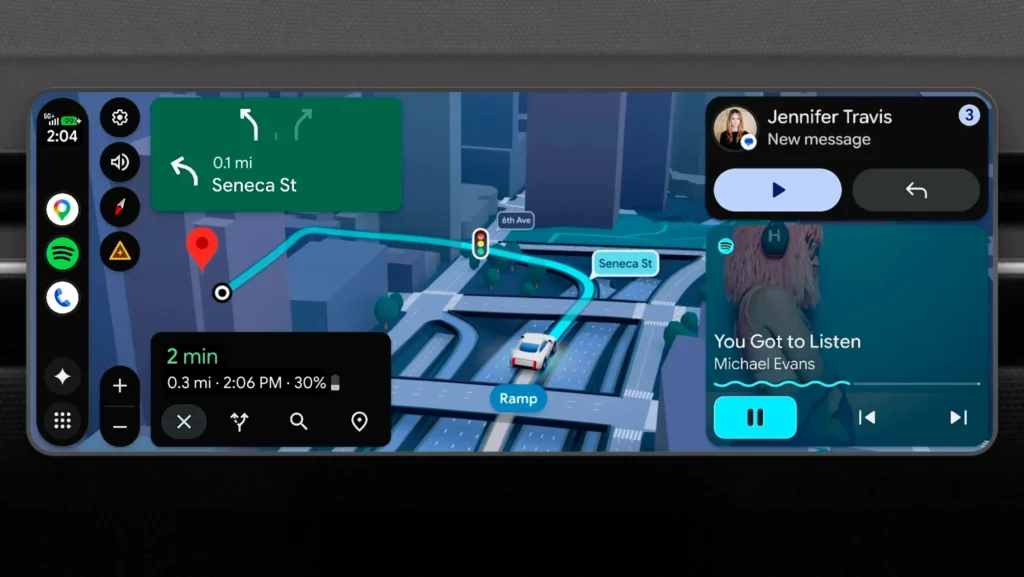
And look, this isn’t just some minor aesthetic polish or a lazy icon refresh. This is a fundamental architectural overhaul. Built from the ground up around the Material 3 Expressive design system, this update completely bridges the gap between your phone and your dashboard. Rolling out in sequential waves later this year, it is bringing full theme personalisation, phone-to-car widget ecosystems, deep lane-level navigation, and—yes, you heard this right—parked high-definition entertainment straight to your vehicle’s center console.
Material 3 Expressive: Your Phone’s Theme, Now in Your Car
Historically, Android Auto felt like a rigid, external utility app running on your car monitor. It didn’t care about your personal style. With this update, your vehicle’s infotainment screen finally behaves like a seamless physical extension of your smartphone.
The system natively inherits the exact colour palettes, geometric typography, and smooth rounded corner paths of the Material 3 Expressive language running on your mobile device. If you change your phone’s theme, your dashboard instantly adapts. But the absolute killer feature here? It finally unlocks Android Widget distribution inside the car.
- Unified Widget Sync: The development work you or your favorite creators have put into your home screen layouts will automatically carry over. You can pin a glanceable smart home widget to check if your garage door is down, or place a dynamic weather tracker directly onto the dashboard grid without opening separate applications.
- Responsive Scaling: Built on Google’s new adaptive layout framework, these widgets are mathematically responsive. Whether your car features a massive vertical tablet panel, a letterbox panoramic widescreen, or a standard rectangular screen, the design blocks fluidly expand and snap to fill the screen flawlessly. No weird stretching, no clipped text.
Immersive 3D Navigation and Lane-Level Guidance
Google Maps within Android Auto is receiving a heavy data elevation to combat increasingly complex urban driving environments. If you’ve ever tried navigating the chaotic, multi-layered highway interchanges around Kuala Lumpur (and we’re not even Bangkok level yet), you know exactly how stressful a flat screen can be.
The standard flat, two-dimensional top-down rendering is making way for a highly contextual, three-dimensional navigation model. The maps dynamically render surrounding landmarks, structural overpasses, and geographic features with high visual clarity.
Crucially, the updated engine features lane-level predictive tracking. By calculating real-world GPS coordinates against updated structural mapping datasets, Android Auto can visually highlight exactly which lane you need to occupy before you reach a confusing split. This means significantly less panic, less late-lane switching, and absolutely zero missed exits.
Parked Entertainment: 60fps HD Video Playback
In a massive policy pivot, Google is finally unifying the entertainment capabilities of Android Auto with their full “Google built-in” automotive operating system ecosystem.
For the first time, users will be able to sit back and stream fluid, 60fps high-definition video playback natively via YouTube and other adaptive video applications directly on the centre console. This is a massive win for EV owners waiting at a charging bay or anyone stuck waiting in a parked car.
But before you get too excited about watching tech reviews while cruising down the highway, Google has built in a hard-locked hardware threshold for absolute safety:
| Vehicle State | Video Status | Audio Status | Safety Action |
| Vehicle in Park | Full HD 60fps Active | Enabled | Fully Unlocked Layout |
| Vehicle in Drive | Immediate Blackout | Background Only | Cryptographic Safety Lock |
The absolute millisecond the vehicle transitions into Drive, the visual feed cuts out instantly to keep your eyes firmly on the road, leaving you with an audio-only background stream. Ah shucks, but still better than the anality that’s built into a Toyota.
Gemini Intelligence Moves to the Driver’s Seat
The conversational architecture of the car is moving past basic, robotic voice-to-text dictation. Driven by the Gemini 3.5 Flash pipeline, the updated virtual assistant can process complex, multi-step contextual commands completely hands-free.
- In-Car Commerce: You can use direct, conversational voice strings to perform complex tasks on the move—such as ordering food drop-offs through integrated apps like DoorDash without ever touching a physical layout.
- Smart Messaging with Magic Cue: When an incoming text arrives, Gemini doesn’t just read it out loud in a lifeless voice. It utilises Magic Cue architecture to analyse the context of the incoming message, cross-reference your live navigation ETA and calendar availability, and suggest intelligent, nuanced, one-tap replies that actually sound natural.
The Verdict: When Can You Get It?
Google has confirmed that the updated Car App Library frameworks are currently live in developer channels, with the consumer system update scheduled to deploy in waves across compatible vehicles later this year. Keep in mind that the high-fidelity parked video features will roll out sequentially for users running Android 17 and higher.
Are you excited to bring your phone’s custom widgets and theme layout over to your dashboard, or are you just looking forward to catching up on YouTube clips while waiting in your parked car? Drop your thoughts in the comment section below!