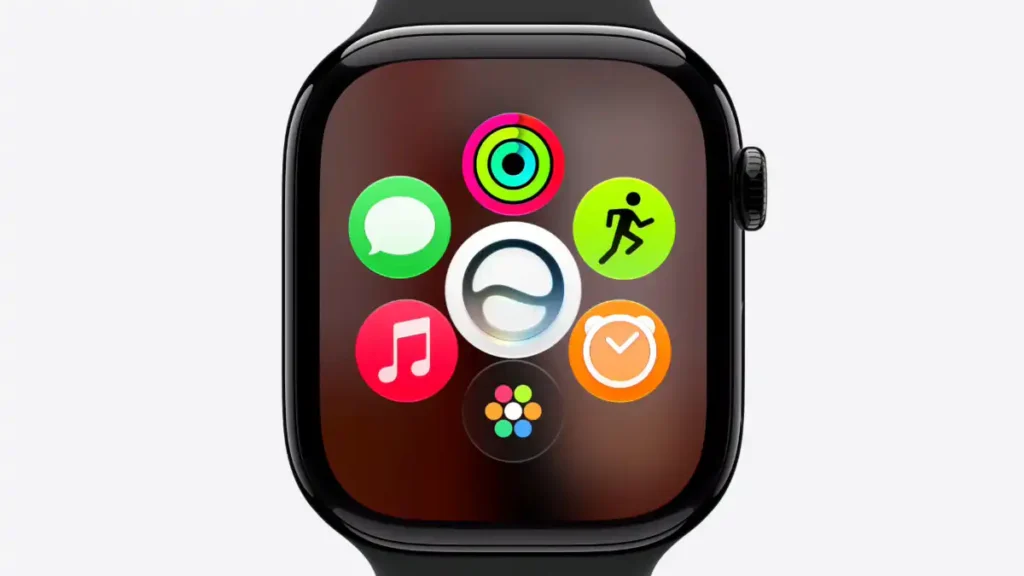
TL;DR / At a Glance: Announced at WWDC26, watchOS 27 delivers a major architecture and software optimisation overhaul for Apple Watch. Key upgrades include Siri AI wrist integration backed by a dedicated conversation app and predictive Smart Stack suggestion widgets. Visually, a new dynamic app grid surfaces five contextually relevant apps alongside the core Siri app. For clinical wellness, the Health app introduces comprehensive perimenopause and menopause tracking with proactive cycle deviation notifications for users 40 and over. Additionally, navigation is optimized via one-handed Smart Stack gesture shortcuts, enabling seamless scrolling, widget selection, and wrist-flick face returns.
For the past few years, the premium wearable landscape has coasted on cruise control. Annual smartwatch updates have largely devolved into a predictable cycle of minor aesthetic watch faces, slightly tweaked background sensor polling rates, and iterative software nudges. The device on your wrist has fundamentally remained a passive repository for incoming push notifications—forcing you to constantly pull out your phone anyway to execute meaningful real-world tasks or digest complex wellness analytics.
At WWDC26, Apple systematically shattered that stagnant design loop. With the unveiling of watchOS 27, Cupertino has delivered a massive structural overhaul that shifts the Apple Watch from a secondary accessory into a predictive, highly autonomous computational layer.
The watchOS 27 Core Evolution
| System Experience Layer | Pre-Existing Wearable Frameworks | watchOS 27 Operational Standard |
| System Interface Access | Static, manually arranged icon honeycombs or rigid text lists. | Predictive Dynamic App Grid: Crown presses immediately surface contextually suggested apps. |
| Clinical Health Metrics | Capped at basic menstrual cycle estimation and baseline temperature logging. | Perimenopause & Menopause Tracking: Proactive deviation alarms and post-menopause bleeding alerts. |
| One-Handed Navigation | Requires dual-hand engagement or limited system accessibility taps. | Multi-Gesture Smart Stack Control: Fluid, single-handed double-taps, single-tap selections, and wrist-flick returns. |
| Application Ecosystem | Fragmented utilities forcing users to hop between three separate tracking tools. | Consolidated Find My App: Unified engine tracking devices, items, and people simultaneously. |
1. Siri AI & The Predictive Dynamic App Grid
The standout mechanical shift in watchOS 27 centers on how the operating system manages on-the-go interface access. Historically, finding a specific app while running or commuting required squinting at a crowded hive of microscopic icons.
The update replaces that clunky framework with a machine-learning-driven dynamic app grid activated instantly by a press of the Digital Crown.
The Dynamic Interface Architecture
| Interface Element | Underlying Background Logic | User Productivity Impact |
| Dynamic App Grid | Monitors local app utilisation velocity and recent activity states. | Instantly displays the top five contextually suggested apps you need in the moment. |
| Smart Stack Suggestion Cards | Analyzes geofenced locations, times, and device communication histories. | Automatically surfaces cards like Parked Car pins, Birthday Messages, or Theater Mode prompts. |
| Dedicated Siri App | Private iCloud synchronization across the device ecosystem. | Features front-and-center on the grid, holding full conversation histories right on the wrist. |
This architectural pivot ensures that Siri AI on the wrist functions as an active companion rather than a simple voice responder. If you initiate a complex multi-turn query on your Mac or iPhone while organizing a project at your desk, a new Smart Stack suggestion card automatically populates on your watch display, allowing you to seamlessly continue the interaction while walking out the door.
2. A Clinical Leap Forward: Perimenopause & Menopause Tracking
Apple’s long-term dedication to medical software engineering is taking a massive leap forward by targeting a deeply underserved chapter of clinical wellness: perimenopause and menopause. Because symptoms frequently manifest years before an individual’s final menstrual period, millions of users navigate severe hormonal and biological changes without realising they’ve entered the transition phase.
To bridge this diagnostic gap, watchOS 27 and iOS 27 inject advanced computer science directly into Cycle Tracking.
For users aged 40 and over, the Health app implements precise machine learning algorithms to constantly monitor logged cycle patterns. The microsecond the system detects a structural rhythm change or deviation suggestive of perimenopause, it flags the variance and pushes a proactive medical notification to your lock screen so you can immediately consult your physician.
Furthermore, if the system logs bleeding instances after an individual has officially completed menopause, it fires a high-priority advisory notification to seek medical attention immediately, treating sudden variances as critical clinical data points rather than passive calendar entries.
Perimenopause Notification Mechanics
| Target User Group | Monitored Input Vector | Native System Response |
| Logged users age 40+ | Structural deviations or pattern changes in logged cycles over time. | Pushes an instant, proactive diagnostic notification to consult a physician. |
| Post-menopause users | Any logged instance of physical bleeding after completion of menopause. | Triggers a high-priority safety alert to speak with a doctor immediately. |
To complement this diagnostic framework, Apple Fitness+ has deployed Strong Through Menopause—a progressive three-week conditioning program featuring weekly Yoga and Strength workouts designed by clinical experts to actively build core strength, optimize balance, enhance mobility, and lower stress levels during the transition.
Read more about Apple Women’s Health Study that reveals new insights on trends in sleep and symptoms in menopause.
3. One-Handed Mastery: Advanced Smart Stack Gestures
The final major usability upgrade is a complete expansion of one-handed physical navigation. We have all found ourselves in scenarios where our secondary hand is completely occupied—whether you are holding a grocery bag, carrying a child, navigating public transit, or holding a handrail on a steep trail.
watchOS 27 solves this by turning simple finger micro-movements into absolute system commands through an optimised Smart Stack gesture shortcut matrix.
Multi-Gesture Smart Stack Control
| Gesture Type | Executed Hand Movement | In-UI Navigation Output |
| Scroll Trigger | Double tap your index finger and thumb together. | Smoothly scrolls down through the stacked widget cards. |
| Select Trigger | Single tap your index finger and thumb together. | Actively opens or expands the current widget card link or pass balance. |
| Escape Trigger | Perform a quick, sharp outward wrist flick. | Instantly closes the sub-menu layer to return to the primary watch face. |
By removing the physical requirement to touch the screen with a secondary hand, watchOS 27 makes tracking on the go truly frictionless. You can double-tap your fingers to cycle through your cards, single-tap to enter an update or open a pinned Wallet transit pass balance, and execute a quick wrist flick to immediately slide back to your primary watch face—all executed with zero screen smudging or structural interruption.
This heavy integration of predictive widgets and localised machine learning algorithms is precisely why the wearable operating system requires such tight data alignment across your primary devices. To see how these wrist-based notification profiles coordinate with the core system schedulers and privacy engines of your phone, read our live WWDC26 Master Wrap-Up Hub Page.
Because these advanced on-wrist conversational indices sync smoothly over private cloud layers, make sure to read our comprehensive analysis of The Trillion-Dollar Handshake: Apple-Google Cloud Alliance to understand exactly how your data remains completely encrypted and protected from prying eyes.
Adam Lobo’s Take
Apple has delivered an absolute engineering home run with watchOS 27. While alternative fitness tracker brands are still treating smartwatches as basic Bluetooth pedometers that just mirror push alerts, Cupertino has successfully turned the Apple Watch into an active, context-aware health asset that works autonomously.
When you put these updates through our signature mamak test—evaluating real-world everyday utility while sitting down at a local spot—you’ll find watchOS 27 simply…smarter. Having a watch face that automatically reminds you to toggle Theater Mode the second you enter a concert venue, surfaces your digital library pass via an automated Smart Stack card, or uses advanced on-device machine learning to dramatically improve treadmill distance metrics without needing an iPhone nearby is massive. Combine that with a profoundly serious, clinically backed approach to women’s health tracking, and Apple has effectively locked down its wearable market supremacy.
The watchOS 27 developer beta goes live today, with a public beta landing next month ahead of the primary consumer rollout this autumn. If you want your wearable tech to actually work for you, this is the update you have been waiting for.
Are you guys ready to ditch your standard icon hives for watchOS 27’s predictive app grid, or do you prefer scrolling through your apps manually? Let me know your thoughts in the comment section below!