TL;DR / At a Glance: Previewed at WWDC26 as a major component of iOS 27, iPadOS 27, and macOS Golden Gate, Apple’s updated Child Safety and Screen Time suite introduces a series of automated protective gates for younger users. Key upgrades include Ask to Browse for Safari website authorisation, age-calibrated Time Allowances across specialised app categories, and an expansion of Communication Safety to actively block gore and violent imagery alongside existing nudity blurs. For third-party apps, developers can natively implement these guardrails using the SensitiveContentAnalysis and PermissionKit APIs.
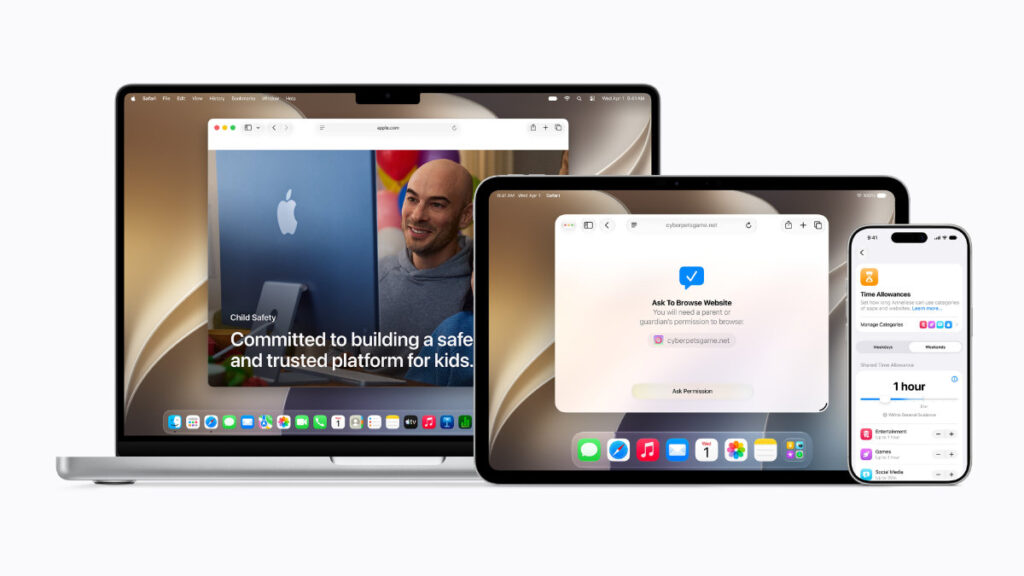
For the past decade, managing a child’s digital life has been an absolute technical nightmare. Most built-in tracking tools feel like clunky afterthought configurations, forcing parents to dig through sixty layers of buried settings menus just to block a single toxic app. As a result, most parents simply throw their hands up in frustration, hand over an unshielded iPad, and hope for the best—leaving kids vulnerable to addictive algorithms and inappropriate web content.
But at WWDC26, Apple made it clear that their vision of hardware optimisation doesn’t just apply to professional developers and power users. Alongside their headline AI frameworks, they unmasked a massive, ground-up reconstruction of their Child Safety and Parental Control systems. Stitched into the foundations of iOS 27, iPadOS 27, and macOS 27 Golden Gate, these features turn the operating system into a proactive digital guardian that actively shields younger eyes while making configuration completely effortless for parents.
The Core Child Safety Architecture
| System Security Vector | Pre-Existing Ecosystem Limits | iOS 27 / macOS Golden Gate Standard |
| Web Access Authorization | Restricted to rigid, easily broken URL blacklists. | Ask to Browse: Seamless cross-platform Safari permission gate for new websites. |
| Media Curation Filters | Capped at blocking skin exposure and explicit text. | Vision Intelligence Scrubbing: Actively detects and intercepts gore or violence. |
| App Allowance Allocation | Static, un-intuitive manual hours capping profiles. | Expert-Calibrated Time Allowances: Age-tailored category caps across defined buckets. |
| Third-Party Integration | Fragmented controls dependent on developer compliance. | Unified SensitiveContentAnalysis and PermissionKit APIs. |
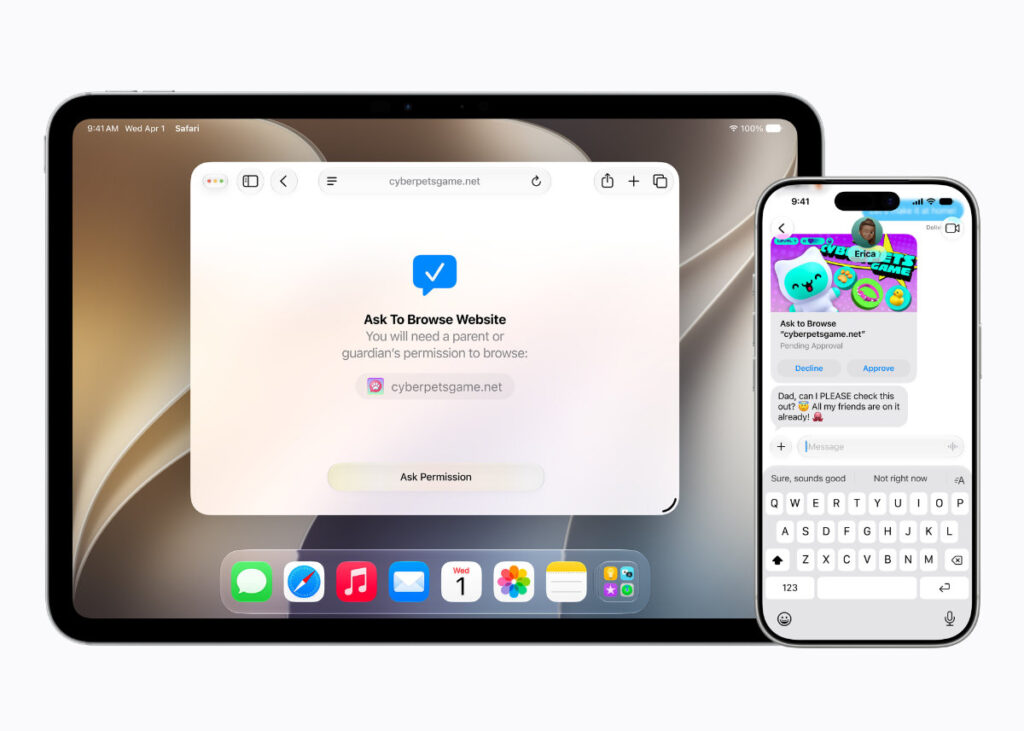
1. The Safari Firewalls: Introducing “Ask to Browse”
The most significant update targeting web exploration is Ask to Browse. Historically, the moment a child wanted to look up an unverified website for a school project, parents had to physically grab the device, unlock it, and manually modify the Safari settings page.
Under the new iOS 27 framework, this friction is completely eliminated by integrating the gate right into the native system communication pipeline.
The “Ask to Browse” Operational Loop
| Step | User Action | System Execution Layer |
| 1 | Child Web Query | A child on a verified account attempts to access a new website inside Safari on their device. |
| 2 | Cryptographic Push | Safari instantly pauses the layout and fires a permission prompt over to the parent. |
| 3 | Cross-Device Resolution | The parent reviews the request context and approves or denies access seamlessly across iPhone, iPad, or Mac. |
This framework operates seamlessly across the entire hardware ecosystem—meaning a child can drop a request from their iPad while completing homework, and the parent can clear the path instantly right from their phone without interrupting their own day. This feature is turned on by default for child accounts under thirteen, acts as a hard requirement for users under sixteen, and remains available right up to eighteen years of age.
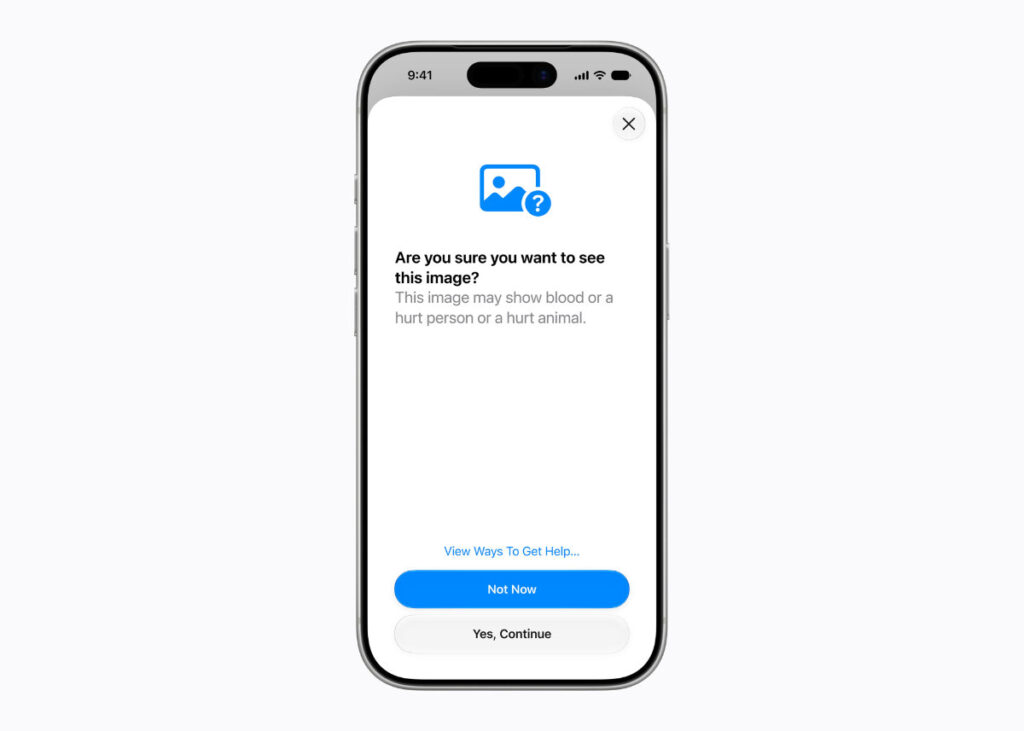
2. Vision Intelligence: Moving Past Nudity Blurs to Block Gore
Apple’s Communication Safety engine has long been celebrated for using on-device machine learning to blur explicit nudity inside FaceTime and Messages. But the internet presents far more complex dangers to a developing brain than simple skin exposure. Algorithmic social feeds routinely expose children to extreme violence, graphic accidents, and visceral gore.
To combat this, Apple is upgrading its on-device computer vision clusters to intercept violent media before a single pixel is viewed.
The system scans incoming and outgoing image arrays natively on the device’s Neural Engine. The second it detects indicators of graphic gore or physical violence in a shared file or web preview, Communication Safety drops a hard, impenetrable blur shield over the content, presenting an age-appropriate warning panel to ensure kids aren’t traumatised by uncurated media streams.
To guarantee that these safety nets aren’t limited to Apple’s first-party apps, the company is exposing this exact pipeline to the global programming community through the SensitiveContentAnalysis and PermissionKit developer APIs—allowing third-party social apps and messaging tools to inherit the exact same ironclad security standards natively.
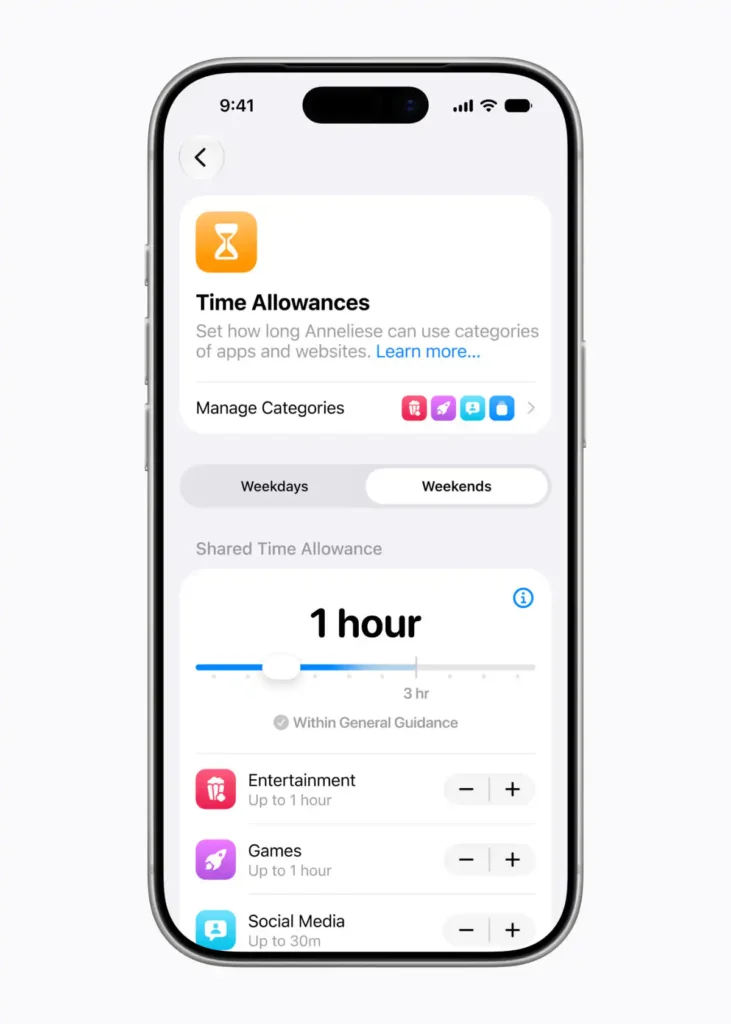
3. Redesigned Screen Time & Clinical Time Allowances
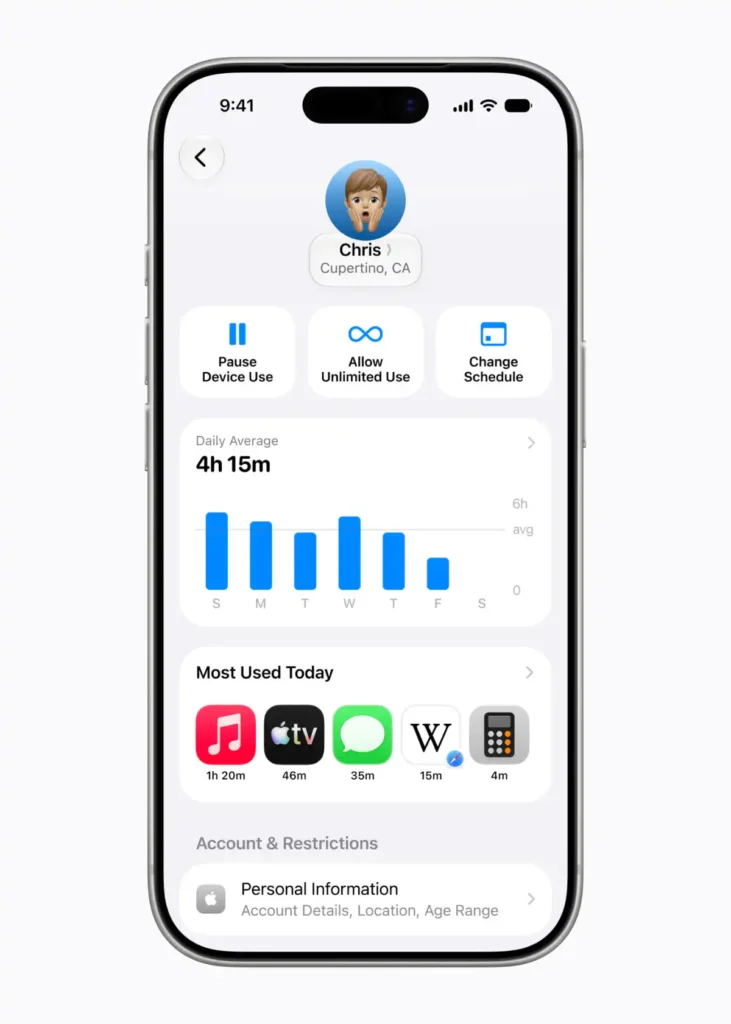
The final structural pillar of this safety rollout is a total design reconstruction of the Screen Time dashboard. Instead of overwhelming parents with complex bar graphs and confusing data points, the new dashboard delivers an immediate, at-a-glance visualisation of a child’s average device usage and top application footprints.
The Time Allocation Optimisation Framework
| Scheduling Mechanism | Background Application Logic | Real-World Family Impact |
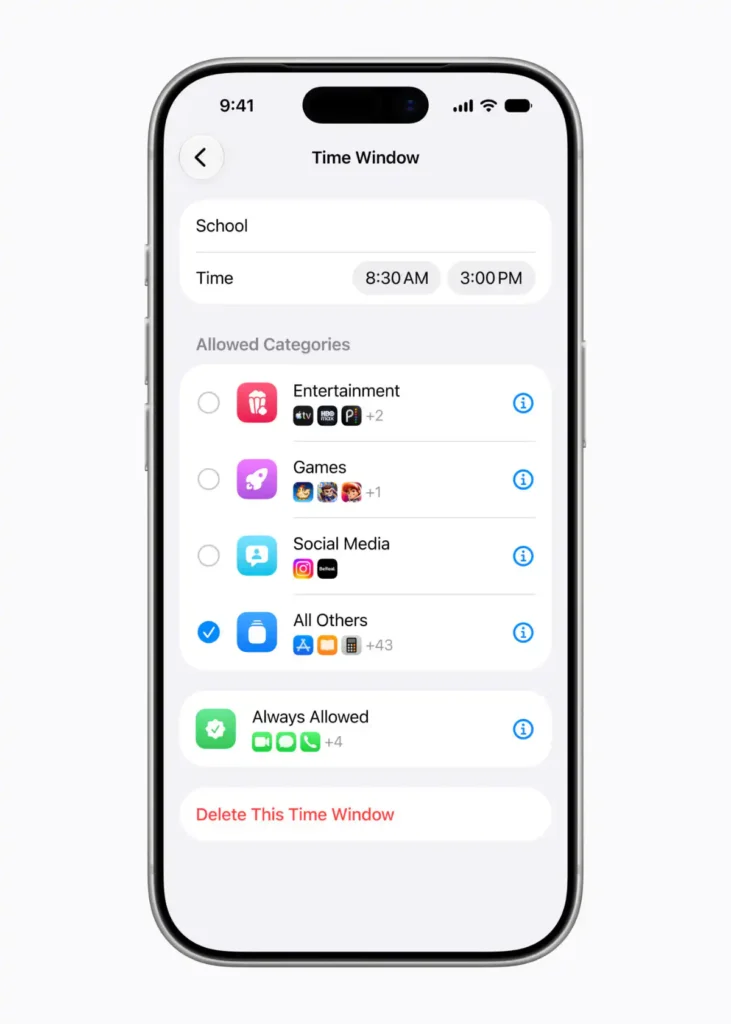
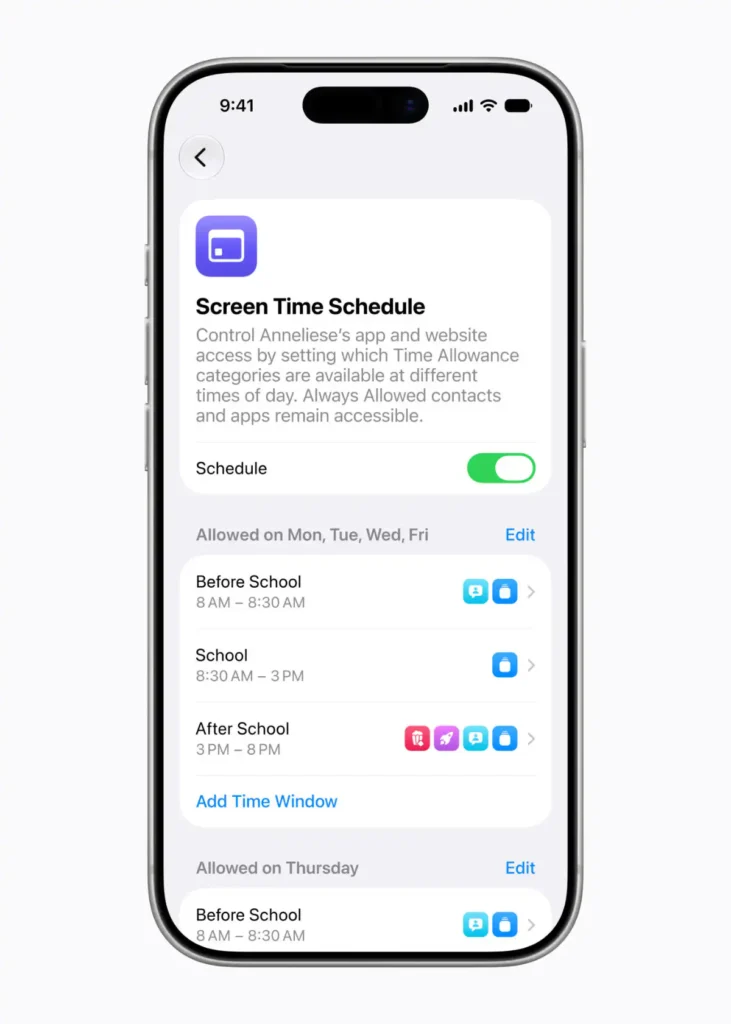
| Clinical Time Allowances | Category-level boundaries based on expert child development research. | Automatically caps specific categories like Social Media, Entertainment, and Games based on age thresholds. |
| Daily Schedules | Kernel-level app accessibility locking parameters across the week. | Restricts entertainment windows to ensure kids stay hyper-focused during school hours. |
| Setup Assistant Controls | Systemwide configuration onboarding arrays. | Enables parents to choose exactly which apps are available from the start and retain control of all additions over time. |
The standout feature here is the introduction of Time Allowances, built in close collaboration with online safety and health experts. Instead of forcing parents to guess how much screen time is appropriate, the operating system pre-populates flexible, age-calibrated time boundaries tailored specifically to your child’s demographic to give parents a helpful starting point. Parents retain complete, granular control and can easily fine-tune these suggested allowances based on what they determine is best for their individual family routines.
Connective Spoke Links
This ground-up parental safety overhaul acts as a crucial anchor across our wider platform rollout analysis. To see how these system guardrails tie into the core software foundations of the new operating system, make sure to read our live WWDC26 Master Wrap-Up Hub Page.
Furthermore, these heavy on-device image scanning and computer vision models are exactly why Apple is enforcing a strict minimum baseline of 8GB of RAM on newer devices. To verify if your family’s current hardware line actually has the processing muscle to execute these safety features, check out our unvarnished Siri AI Silicon Ceiling compatibility breakdown.
Adam Lobo’s Take
Apple has delivered an absolute masterclass in practical software engineering with this Child Safety update. While other consumer platforms expect parents to act like full-time cybersecurity analysts just to protect their households, Cupertino has built a collection of tools that are powerful, incredibly intuitive, and seamlessly unified across the entire ecosystem.
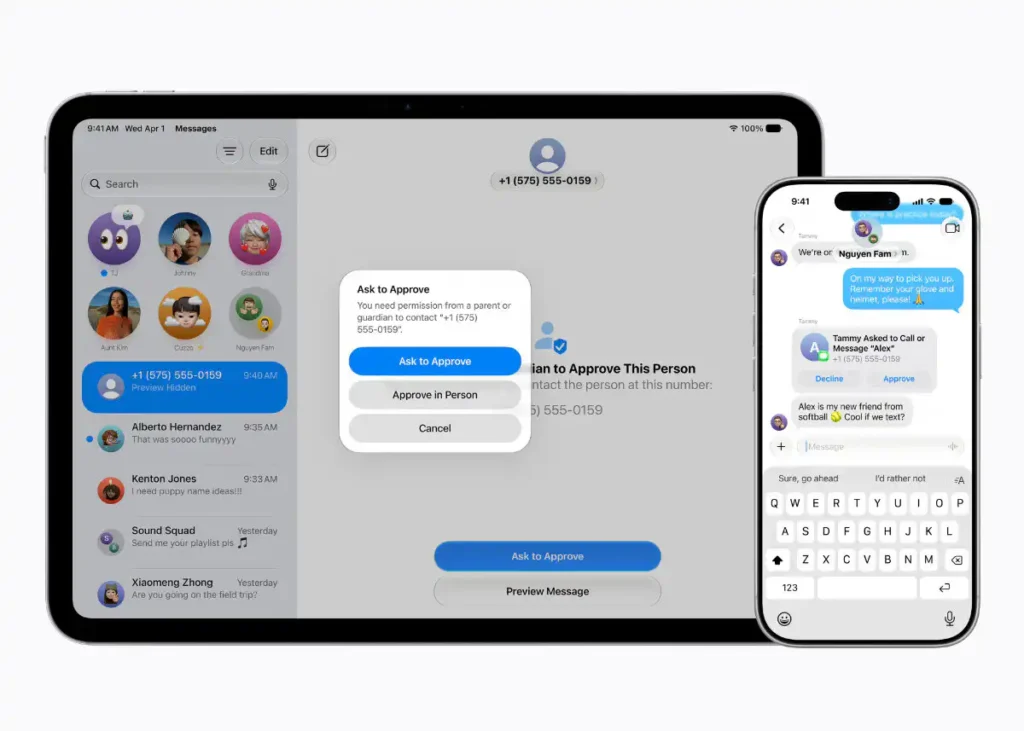
The value for this Child Safety update is clear as day. Features like a child sending a remote web request through Ask to Browse, or managing contact approvals directly inside the native messaging pipeline without configuration headaches, are tools designed for real-world parenting, not speculative tech hype. By packaging these advanced vision metrics and contact safety networks into accessible developer APIs like SensitiveContentAnalysis, Apple is forcing the entire app economy to elevate its safety standards. It is clean, it runs securely on local device hardware, and it sets a phenomenal new blueprint for family tech security.
The parental control updates drop as a free addition with the primary software releases this autumn. If you have been struggling to manage your household’s digital health, this update is going to change your life.
Are you guys ready to hand your household’s web tracking tasks over to Apple’s updated Screen Time engine, or do you prefer handling device rules entirely manually? Let me know your thoughts in the comment section below!